AI coding agents on the command line: spotting them when they work for someone else
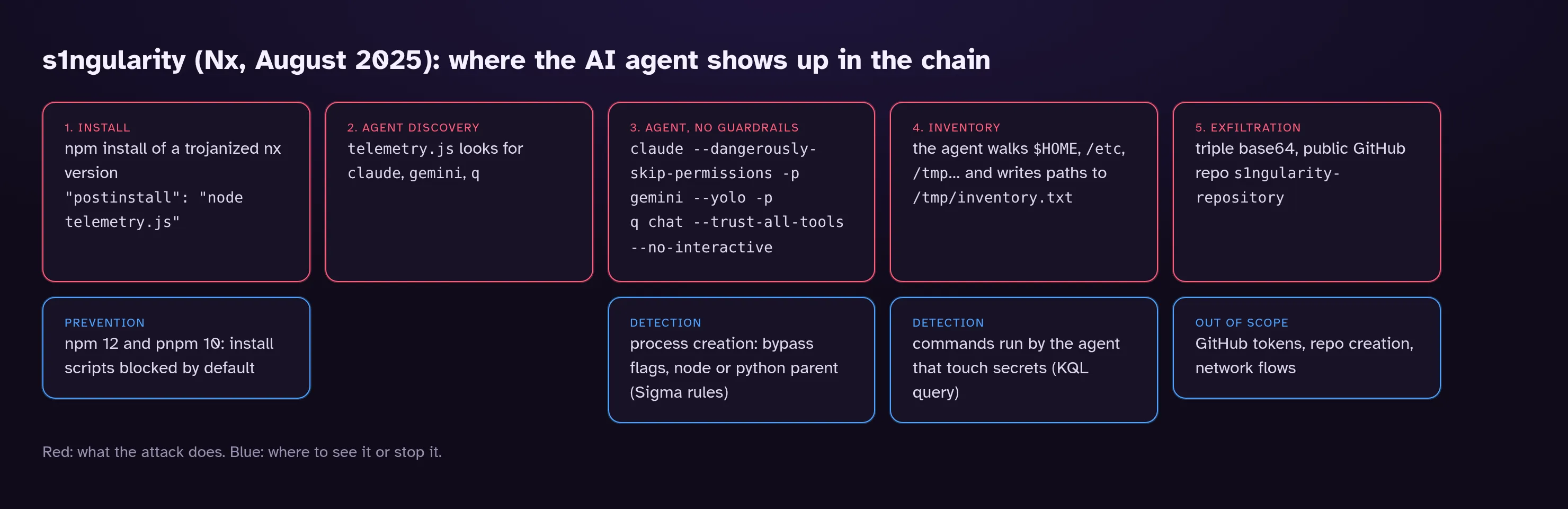
claude --dangerously-skip-permissions -p "<prompt>"
gemini --yolo -p "<prompt>"
q chat --trust-all-tools --no-interactive "<prompt>"
Those three lines come from telemetry.js, the script slipped into several trojanized versions of the nx npm package published overnight on August 26–27, 2025. The incident got the name “s1ngularity”. No exploit, no shellcode. The script looked for AI assistants installed on the developer’s machine and asked them, with the flags that switch off every confirmation prompt, to crawl the disk for crypto wallets, SSH keys and .env files.
Say “AI security” and most people think prompt injection, model poisoning or data leaking through a chatbot. All real problems. For a SOC, though, the most tangible piece is much more mundane: a binary sitting on hundreds of endpoints, able to run shell commands, and one flag away from running them unsupervised. You can catch that with the tooling you already have, provided you know what it looks like in the logs. That last part held a couple of surprises for me.
The numbers worth remembering
The most thorough write-up I’ve read is Wiz’s, published on September 3, 2025. A few figures stand out:
- roughly half of the victims had at least one AI CLI installed; Claude Code was the most common, Gemini CLI showed up on about 15% of victims, Amazon Q on about 5%;
- almost a quarter of the Claude runs were refused by the model, and Wiz points out that the words “penetration testing” in some prompt variants were what triggered the refusals;
- overall, the AI step managed to exfiltrate data in fewer than a quarter of cases.
Easy to conclude that an AI agent makes a lousy accomplice. That would miss the point. The same script also grabbed GitHub and npm tokens directly, and the second phase of the attack exposed more than 6,700 private repositories. The agent was one module among several. A module that works one time in four is still a module the attacker didn’t have to write.
ATT&CK caught up; detection hasn’t
As of v20, ATT&CK has two techniques dedicated to LLMs, both filed under the Execution tactic: T1699 Direct Prompt Injection and T1698 Indirect Prompt Injection. The latter covers malicious instructions hidden in content “that the adversary expects may be processed by an LLM”: a web page, a document, an email, source code.
Both pages list mitigations. Neither offers a detection strategy. That’s not a criticism; it makes sense, since the prompt itself never lands in any log the SOC collects. What you can see is what the agent does with its hands: the processes it starts, the files it reads. Whether the order came from a malicious postinstall or a booby-trapped README, the footprint on the endpoint looks much the same.
I wouldn’t even call s1ngularity prompt injection, for what it’s worth. The malware didn’t trick anything. It drove the agent exactly the way the vendor documentation says you can. Which is why this post sticks to process creation rather than prompt content.
The flags that take the guardrails off
Every tool has its own way of saying “run everything, don’t ask me”. I pulled the flags from the help output of the versions installed in my lab. The one exception is Amazon Q, which I didn’t install; those flags come from StepSecurity’s analysis.
| Tool (version tested) | Skips confirmations | Headless mode |
|---|---|---|
| Claude Code 2.1.281 | --dangerously-skip-permissions, --permission-mode bypassPermissions |
-p, --print |
| Gemini CLI 0.61.0 | -y, --yolo, --approval-mode yolo |
-p, --prompt |
| Codex CLI 0.156.1 | --dangerously-bypass-approvals-and-sandbox |
exec subcommand |
| Cursor CLI 2026.09.15 | -f, --force, --yolo |
-p, --print |
| OpenCode 1.18.32 | --auto (on opencode run) |
run subcommand |
| Amazon Q (not tested) | --trust-all-tools |
--no-interactive |
The long, explicit forms (--dangerously-…, --trust-all-tools) are easy to hunt for. Nobody types them by accident. The short ones, -y and -f, are a different story: a rule matching those across every command line would be useless. I left them out, knowingly. That’s a gap. And these flags move between releases. The versions I tested also ship --allow-dangerously-skip-permissions (Claude Code) and --dangerously-bypass-hook-trust (Codex), neither of which I knew about. A list like this one needs rechecking after every major update.
The lab: replay the shape, not the payload
To see what actually shows up, I built a minimal npm package whose postinstall runs node telemetry.js, like the real one. My telemetry.js launches claude and gemini with the same flags but no prompt, just --version. Same command line shape, nothing sent to any API.
First surprise, and a pleasant one: it didn’t work. npm 12.0.2 refused to run the script.
npm warn install-scripts 1 package had install scripts blocked because they are not covered by allowScripts:
npm warn install-scripts   demo-postinstall@1.0.0 (postinstall: node telemetry.js)
Since npm 12 (July 2026), dependency preinstall, install and postinstall scripts don’t run unless they’re explicitly approved in the allowScripts field of package.json. pnpm has done this since version 10. On an up-to-date machine, s1ngularity as shipped would have died at step 1. How many laptops and CI runners in your estate are still on npm 10 or 11, though? I have no idea. It’s a good question for whoever owns your build images.
I approved the package and ran the install again under strace to capture every execve:
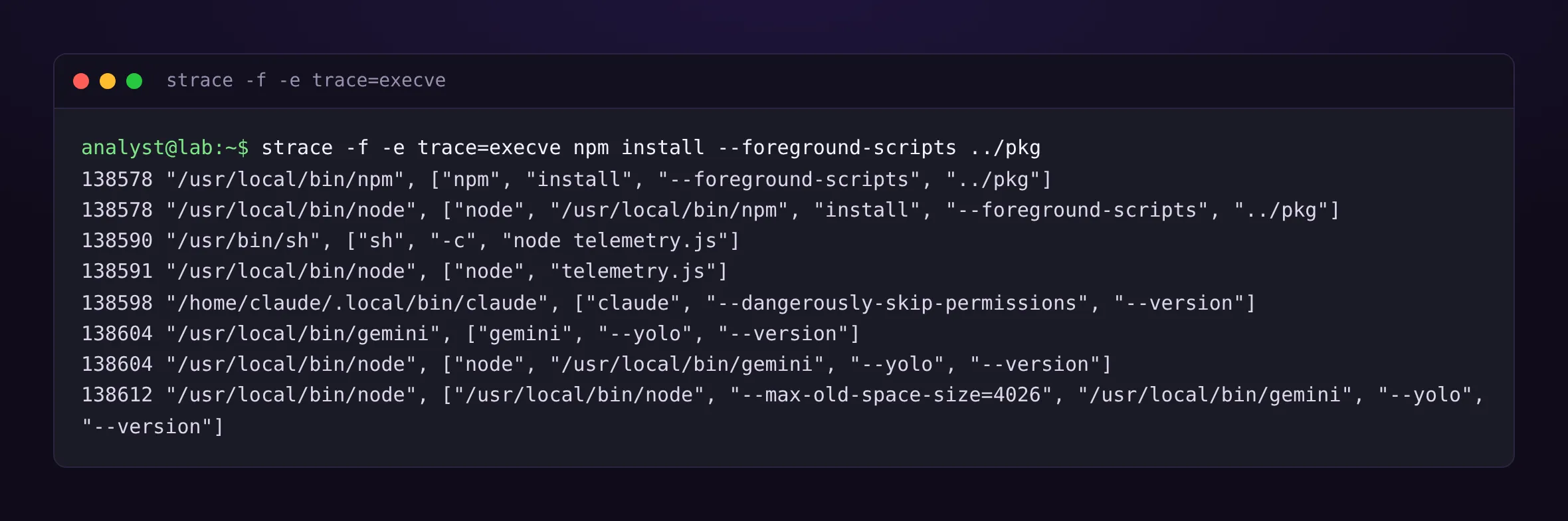
The tree is exactly what you’d expect: npm → sh -c "node telemetry.js" → node telemetry.js → the agent. What stopped me was the next bit.
The binary name lies
Looking at the live processes under /proc, here’s what the kernel sees, and therefore what an EDR keyed on the executed image sees:
| Launched as | Actual executable (/proc/<pid>/exe) |
Short name (comm) |
|---|---|---|
claude --dangerously-skip-permissions |
~/.local/share/claude/versions/2.1.281 |
claude |
gemini --yolo |
/usr/local/bin/node |
node-MainThread |
With the native installer, ~/.local/bin/claude is a symlink to a binary named after… its version number. A rule on Image|endswith: '/claude' sees nothing, and the file name changes with every update. For Gemini CLI, Codex or anything else installed through npm, the image is node and the tool name only appears in the arguments.
Bottom line: for these tools, match on the command line, never on the image name. If you grew up on Windows rules like Image|endswith: '\rundll32.exe', that feels backwards. It’s also precisely the kind of detail that lets a rule pass every test on paper and never fire in production. I haven’t tested the Windows side. The principle should hold for npm-installed tools, which go through node.exe, but check your own telemetry before relying on it.
Two rules, two confidence levels
The first rule looks for the bypass flags and nothing else. I set it to medium and treat it as an inventory rule more than an alert: on a developer fleet it will surface people who run their agent in YOLO mode on purpose, and that’s useful to know in itself.
title: AI Coding Agent CLI Started With Approvals Disabled
id: 35d0ca2e-22eb-4f27-b7b6-3d7d81c7cb74
status: experimental
description: |
    Detects an AI coding agent CLI (Claude Code, Gemini CLI, Codex, Amazon Q, Cursor CLI)
    started with the flags that disable per-action approval. Legitimate in sandboxes and CI,
    abused by the s1ngularity malware (Nx, August 2025) to search a workstation for secrets.
references:
    - https://www.stepsecurity.io/blog/supply-chain-security-alert-popular-nx-build-system-package-compromised-with-data-stealing-malware
    - https://www.wiz.io/blog/s1ngularitys-aftermath
author: PurpleLog
date: 2026-10-17
tags:
    - attack.execution
    - attack.t1059.004
    - attack.credential-access
    - attack.t1552.001
logsource:
    category: process_creation
    product: linux
detection:
    selection_explicit:
        CommandLine|contains:
            - '--dangerously-skip-permissions'
            - 'bypassPermissions'
            - '--dangerously-bypass-approvals-and-sandbox'
            - '--trust-all-tools'
            - '--approval-mode yolo'
            - '--approval-mode=yolo'
    selection_yolo_cli:
        CommandLine|contains:
            - 'gemini'
            - 'cursor-agent'
    selection_yolo_flag:
        CommandLine|contains:
            - ' --yolo'
            - ' --force'
    condition: selection_explicit or all of selection_yolo_*
falsepositives:
    - Developers who run their agent in YOLO mode on purpose
    - CI pipelines and sandboxed containers running agents headless
level: medium
The second one adds the context that made s1ngularity stand out: the agent isn’t started from an interactive shell but from a script interpreter. A human typing claude does it from bash or zsh. A postinstall hook, a Python script or an implant does it from node or python.
title: AI Coding Agent CLI Started With Approvals Disabled By A Script Interpreter
id: 14584851-376f-448d-aca6-9f471a6b5220
related:
    - id: 35d0ca2e-22eb-4f27-b7b6-3d7d81c7cb74
      type: derived
status: experimental
description: |
    Detects an AI coding agent CLI started with approvals disabled by a Node.js or Python
    process rather than by an interactive shell, as the s1ngularity postinstall script did.
references:
    - https://www.stepsecurity.io/blog/supply-chain-security-alert-popular-nx-build-system-package-compromised-with-data-stealing-malware
author: PurpleLog
date: 2026-10-17
tags:
    - attack.execution
    - attack.t1059.004
    - attack.credential-access
    - attack.t1552.001
    - attack.initial-access
    - attack.t1195.002
logsource:
    category: process_creation
    product: linux
detection:
    selection_flags:
        CommandLine|contains:
            - '--dangerously-skip-permissions'
            - '--dangerously-bypass-approvals-and-sandbox'
            - '--trust-all-tools'
            - ' --yolo'
    selection_parent:
        ParentImage|endswith:
            - '/node'
            - '/python'
            - '/python3'
            - '/bun'
            - '/deno'
    filter_main_self_relaunch:
        # Gemini CLI re-executes itself under node: the parent already carries the tool name
        ParentCommandLine|contains:
            - 'gemini'
            - 'codex'
            - 'cursor-agent'
    condition: all of selection_* and not 1 of filter_main_*
falsepositives:
    - IDE extensions and orchestration tools written in Node.js that drive the CLI
level: high
filter_main_self_relaunch comes straight out of the lab. Without it, every Gemini call fires twice, because the tool re-executes itself under node. Both rules pass sigma check with zero errors or issues and convert cleanly to KQL and SPL with sigma convert. To test them against what I’d actually observed, I replayed their logic in a short Python script over the captured command lines:
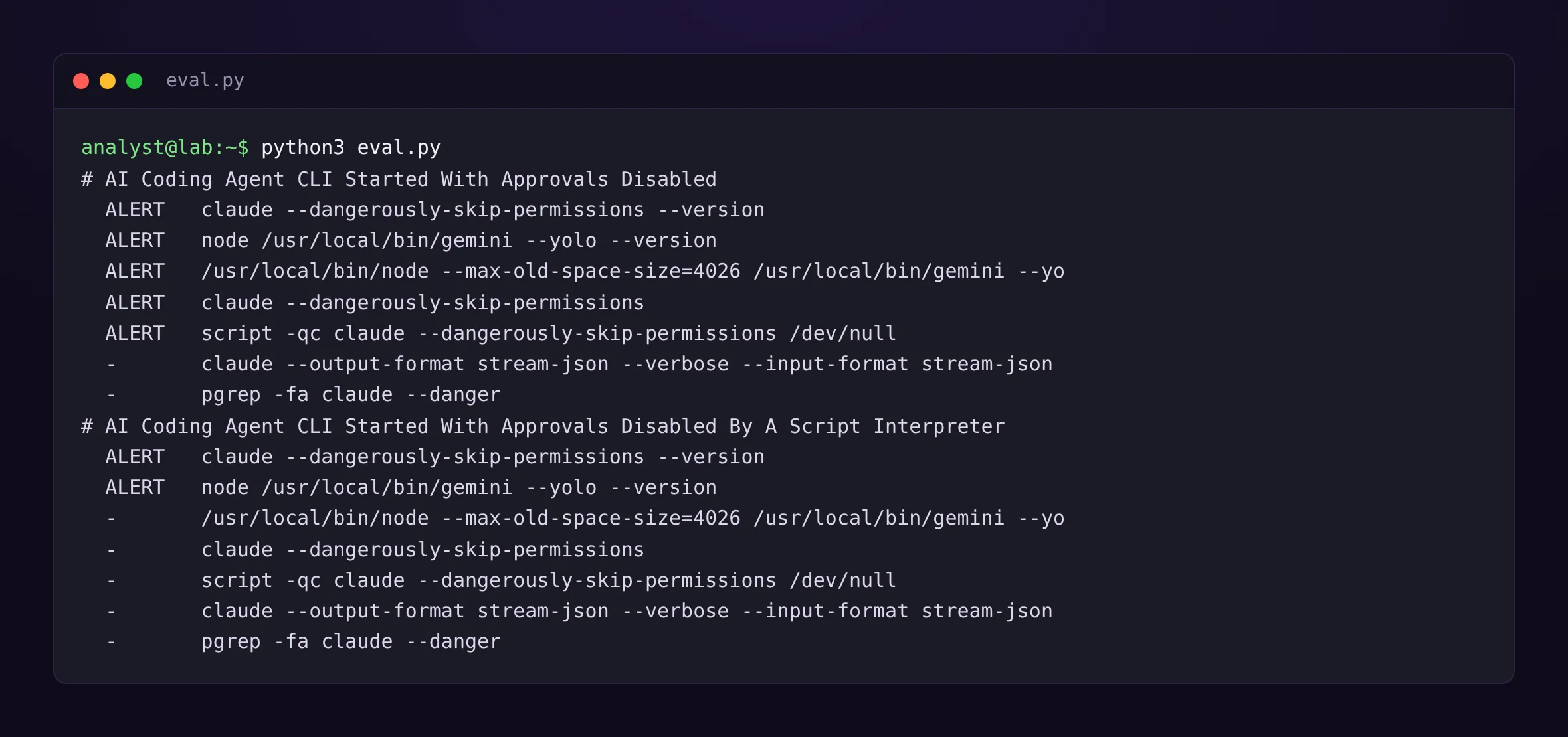
The first rule is chatty, and not only because of developers. The wrapper script -qc "claude --dangerously-skip-permissions" fires too, since its own command line carries the flag. Same with bash -c, timeout, sudo. Deduplicate per host and user over a few minutes, or one session turns into a burst.
The second is cleaner on my sample, but the sample is small. IDE extensions written in Node.js that drive the CLI are the most likely false positive. I didn’t test any, and I expect to exclude one or two by their ParentCommandLine.
What the agent does next
Those rules catch the launch. They’re blind when a developer starts the agent normally and the malicious instruction arrives later, inside a file it reads (the T1698 scenario). Then you have to look at what the agent executes.
Here Claude Code leaves a very clear fingerprint. Watching the process tree of my own session, every command the agent runs goes through a shell shaped like this:
/bin/bash -c source /home/<user>/.claude/shell-snapshots/snapshot-bash-<timestamp>-<id>.sh 2>/dev/null || true && … && eval '<the command>' && pwd -P >| /tmp/claude-<id>-cwdThe .claude/shell-snapshots/ path and the actual command both sit in the shell’s command line. For hunting, that’s a gift. Those shells also carry CLAUDECODE=1 in their environment plus an AI_AGENT variable with the tool name and version, but few EDRs collect environment variables on every process creation. None of this is documented as stable, either. It’s what version 2.1.281 does; the next one may not. For tools launched through node, I don’t have an equivalent verified fingerprint. The sturdiest approach there is to look for processes whose parent command line contains the agent’s name.
Here’s the query I’d run in Microsoft Defender for Endpoint:
// Commands started by an AI agent that touch secrets
let secrets = @"\.ssh/id_|\.aws/credentials|\.npmrc|\.git-credentials|\.env\b|keystore|wallet|inventory\.txt";
DeviceProcessEvents
| where Timestamp > ago(7d)
| where ProcessCommandLine contains "/.claude/shell-snapshots/"
    or InitiatingProcessCommandLine contains "/.claude/shell-snapshots/"
    or InitiatingProcessCommandLine has_any ("gemini", "codex", "cursor-agent", "opencode")
| where ProcessCommandLine matches regex secrets
| project Timestamp, DeviceName, AccountName, FileName, ProcessCommandLine,
    Parent = InitiatingProcessFileName, ParentCommandLine = InitiatingProcessCommandLine
| sort by Timestamp desc
I tested the regex in Python against commands that should match (cat ~/.aws/credentials, cat .env, cat /srv/app/.env.local…) and commands that shouldn’t (python3 -m venv .venv, ls ~/.ssh/known_hosts, export NODE_ENV=production). It also catches cat ~/.ssh/id_rsa.pub, a public key: harmless, a bit of noise. The query passes Microsoft’s official KQL parser against the documented DeviceProcessEvents schema. I haven’t run it on a real tenant.
An agent reading a .env in the repo it’s working on is normal. An agent reading ~/.aws/credentials when the developer asked it to fix a unit test deserves a question. The query can’t draw that line. The analyst has to.
Before you alert: know who runs what
I wouldn’t ship any of these rules without a week of inventory first. On a developer fleet, unsupervised agent usage is often more widespread than the security team assumes, and a rule that throws 300 alerts on day one gets disabled on day two.
// Inventory: who runs an AI agent with approvals off, and from which parent
DeviceProcessEvents
| where Timestamp > ago(30d)
| where ProcessCommandLine has_any ("dangerously-skip-permissions", "bypassPermissions",
    "dangerously-bypass-approvals-and-sandbox", "trust-all-tools", "yolo")
| summarize Launches = count(), Devices = dcount(DeviceId), Accounts = dcount(AccountName),
    Samples = make_set(ProcessCommandLine, 5)
    by Parent = InitiatingProcessFileName, GrandParent = InitiatingProcessParentFileName
| sort by Launches asc
Ascending sort on purpose: rare parent/grandparent pairs are the ones I care about. Two thousand launches from zsh on the platform team’s laptops is a conversation with the platform team. A single launch from python3 on a build server is a ticket.
Prevention exists, and it helps detection
Two settings the SOC should know about, even if someone else deploys them.
Claude Code reads a managed settings file that users can’t override: /etc/claude-code/managed-settings.json on Linux, /Library/Application Support/ClaudeCode/ on macOS, C:\Program Files\ClaudeCode\ on Windows. Setting permissions.disableBypassPermissionsMode to true there blocks the bypass mode. For Gemini CLI, the 0.61.0 code reads a security.disableYoloMode setting from /etc/gemini-cli/settings.json; I found it in the source and haven’t verified it in practice yet.
Why does detection care? On a fleet where those settings are deployed, the first rule goes almost quiet, and every alert left is an exception to understand rather than normal usage to triage.
Still open
s1ngularity was the first public attack to outsource its reconnaissance to an AI agent already installed on the victim’s machine. There will be others, and they won’t all settle for politely asking for a file inventory. The durable part here isn’t the two rules; they’ll age along with the flags. It’s the idea that an AI agent on an endpoint is just another executable, with a command line, a parent and children. That, we know how to watch.
What I don’t yet know how to watch well is the agent started normally, by the right person, taking orders from a file it shouldn’t have trusted. The secrets query catches part of it. For the rest, I’d genuinely like to hear your ideas.
References
- StepSecurity, s1ngularity: Popular Nx Build System Package Compromised with Data-Stealing Malware
- Wiz (Rami McCarthy), s1ngularity’s aftermath: analysis of Nx supply chain attack, September 3, 2025
- MITRE ATT&CK, T1698 Indirect Prompt Injection and T1699 Direct Prompt Injection
- MITRE ATT&CK, T1552.001 Credentials In Files, T1195.002 Compromise Software Supply Chain
- Socket, npm v12 Ships With Install Scripts Off by Default
- Anthropic, Claude Code settings reference and Deploy managed settings
--helpoutput of Claude Code 2.1.281, Gemini CLI 0.61.0, Codex CLI 0.156.1, Cursor CLI 2026.09.15 and OpenCode 1.18.32, run in the lab