PowerShell -EncodedCommand: eleven ways to spell one parameter
%COMSPEC% /b /c start /b /min powershell -nop -w hidden -encodedcommand …
That’s the one-liner Cobalt Strike’s psexec_psh module runs on a target, as recorded by The DFIR Report in a BlackSuit intrusion published in August 2024. The same write-up also shows the actor using an encoded PowerShell command to switch on RDP on a file server. Nothing fancy. This is encoded PowerShell at its most ordinary.
The obvious first rule is CommandLine contains "-encodedcommand". It catches the line above, and very little else.
Base64 is not a secret
-EncodedCommand takes a Base64 string, and the pwsh documentation is specific: it has to be UTF-16LE text. Microsoft pitches the parameter as a way around nested-quoting headaches, which is fair. Deployment tools use it legitimately all the time.
Attackers like it for a different reason. The command line stops being readable at a glance, strings like DownloadString or IEX vanish from it, and naive keyword searches come up empty. Decoding takes one line, though. Encoding doesn’t beat a SOC; it beats a tired analyst and an overly literal rule.
Lab: eleven spellings, eleven executions
The docs list three forms: -EncodedCommand, -e and -ec. I wanted to know what PowerShell actually accepts, so I installed pwsh 7.6.7 (the official Linux arm64 build) and fed it the same harmless payload, Write-Output "purple test" encoded as UTF-16LE, with eleven different spellings of the parameter.
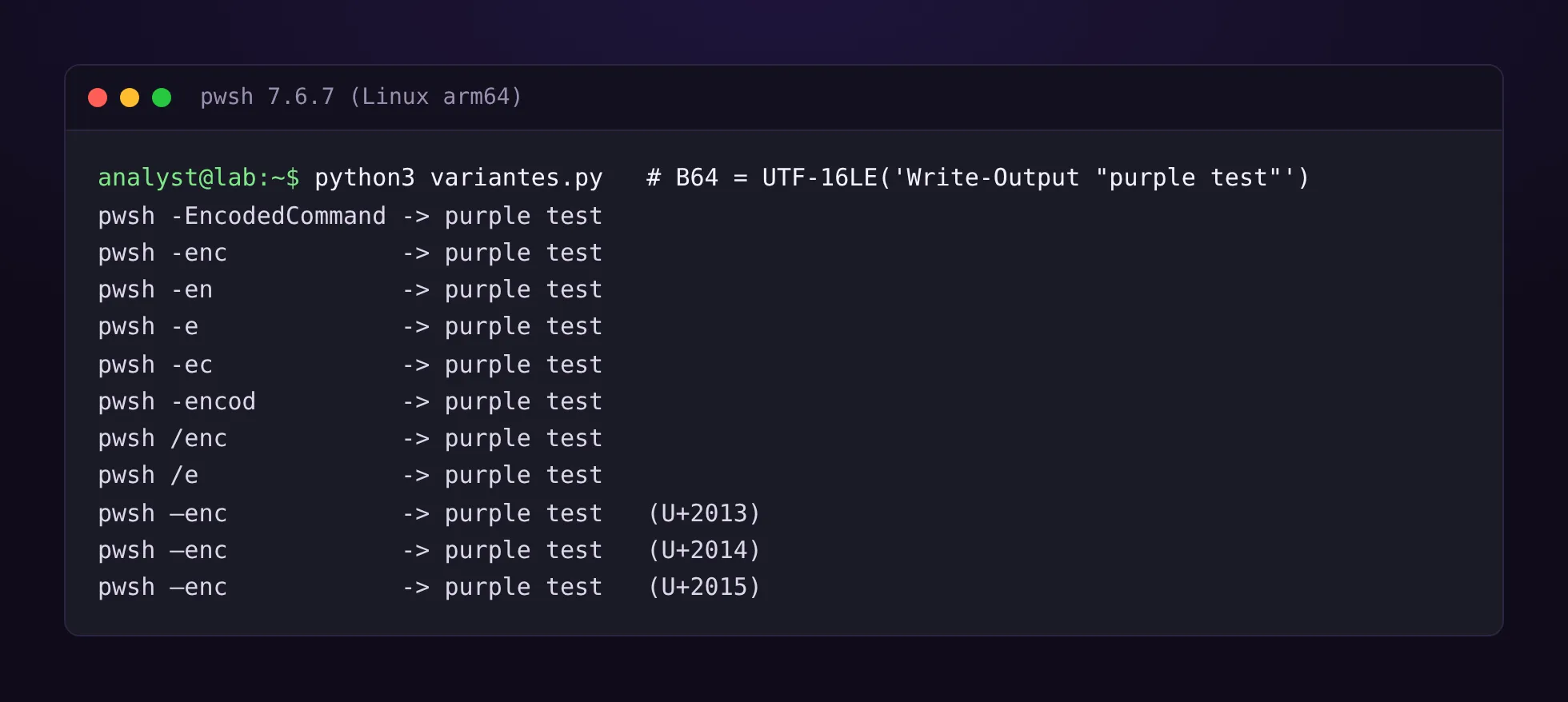
Every single one ran. Abbreviations (-en, -enc, -encod), a forward slash instead of a hyphen, and three Unicode dashes: en dash –, em dash — and horizontal bar ―. That last group is the nasty one. Paste a command out of Word or an email client and you get exactly those characters, and a rule written with an ASCII hyphen will never see them.
Caveat: this was pwsh 7 on Linux, not Windows PowerShell 5.1 on a real Windows box. The powershell.exe documentation does confirm that / works from cmd.exe, but I haven’t checked the Unicode dashes on 5.1. If you have a Windows VM around, it’s a two-minute test. My working assumption is that they work there too.
Where the evidence actually lands
One execution, four very different pictures depending on the log source.
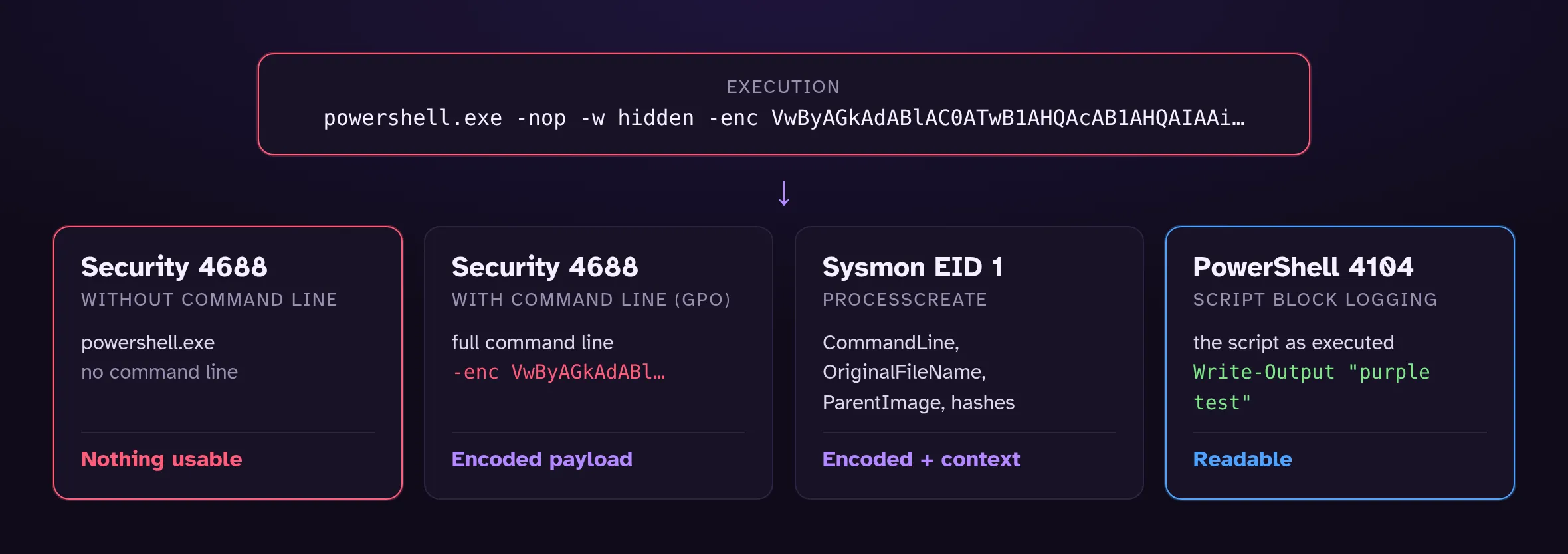
- Security 4688 only carries the command line if “Audit Process Creation” is enabled and the “Include command line in process creation events” setting is on. That second one is off by default. Without it, all you learn is that powershell.exe started.
- Sysmon event 1 gives you the full command line, the
OriginalFileNamefrom the binary’s version info, the parent and the hashes. Along with your EDR, this is the source I’d pick for this use case. - PowerShell 4104 (Script Block Logging) records the content of every script block PowerShell processes, so you get the script as it runs, already decoded. For triage, nothing beats it. Microsoft recommends pairing it with Protected Event Logging, since any credentials sitting in a script end up in the log as well.
The Sigma rule
This is the version I’m keeping. It passes sigma check with zero errors and zero issues against the ATT&CK v20 data bundled with pySigma.
title: PowerShell Launched With an Encoded Command (-EncodedCommand Prefixes)
id: c90a658a-4717-40f5-afb7-074a7ce0ba97
status: experimental
description: |
  Detects powershell.exe or pwsh.exe launched with -EncodedCommand or one of its
  abbreviations (-e, -ec, -en, -enc…), including with / or a Unicode dash.
references:
  - https://learn.microsoft.com/powershell/module/microsoft.powershell.core/about/about_pwsh
  - https://attack.mitre.org/techniques/T1059/001/
author: PurpleLog
date: 2026-10-17
tags:
  - attack.execution
  - attack.t1059.001
  - attack.stealth
  - attack.t1027.010
logsource:
  category: process_creation
  product: windows
detection:
  selection_img:
    - Image|endswith:
        - '\powershell.exe'
        - '\pwsh.exe'
    # A renamed powershell.exe still carries its original name in the PE metadata
    - OriginalFileName:
        - 'PowerShell.EXE'
        - 'pwsh.dll'
  selection_cli:
    # windash expands "-" to /, –, — and ―
    CommandLine|windash|contains:
      - ' -e '
      - ' -ec '
      - ' -en'
  condition: all of selection_*
falsepositives:
  - Deployment and monitoring agents that ship encoded scripts (SCCM, Intune, some RMM tools)
level: medium
windash is doing the heavy lifting here. It generates the / and Unicode-dash variants for you, so there’s nothing to forget. The OriginalFileName branch handles a PowerShell binary copied under another name.
Something I only noticed while validating the tags: in ATT&CK v20, tactic TA0005 is no longer “Defense Evasion”, it’s “Stealth”. Tag a rule attack.defense-evasion and sigma check now flags it. The first version of this very post shipped with that mistake.
Run through pySigma’s microsoft_xdr pipeline, the rule becomes this Defender XDR query (raw output, untouched):
DeviceProcessEvents
| where ((FolderPath endswith "\\powershell.exe" or FolderPath endswith "\\pwsh.exe") or (ProcessVersionInfoOriginalFileName in~ ("PowerShell.EXE", "pwsh.dll"))) and (ProcessCommandLine contains " -e " or ProcessCommandLine contains " /e " or ProcessCommandLine contains " –e " or ProcessCommandLine contains " —e " or ProcessCommandLine contains " ―e " or ProcessCommandLine contains " -ec " or ProcessCommandLine contains " /ec " or ProcessCommandLine contains " –ec " or ProcessCommandLine contains " —ec " or ProcessCommandLine contains " ―ec " or ProcessCommandLine contains " -en" or ProcessCommandLine contains " /en" or ProcessCommandLine contains " –en" or ProcessCommandLine contains " —en" or ProcessCommandLine contains " ―en")
About that “ -en”…
Then I replayed the rule logic against a handful of perfectly boring command lines. That’s where ' -en' fell apart.
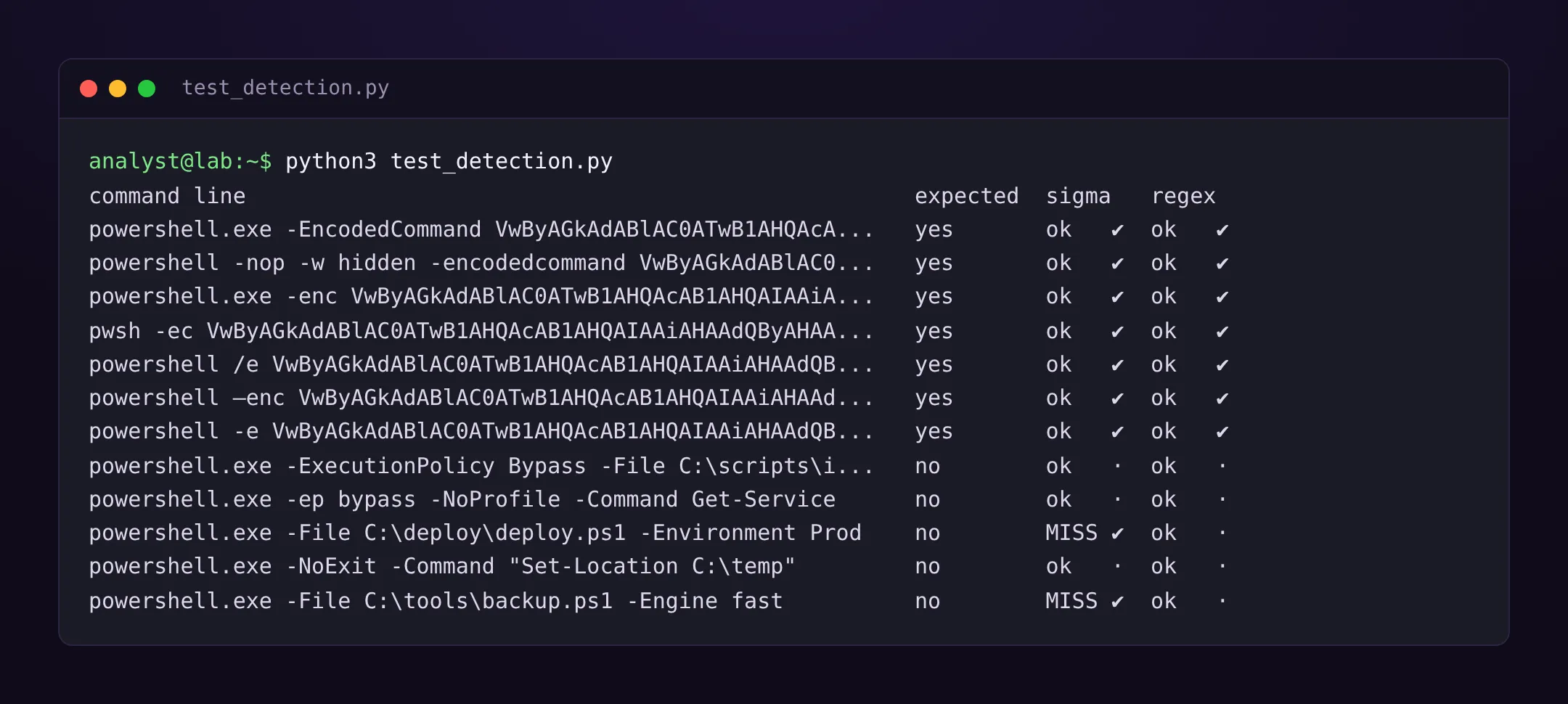
-File deploy.ps1 -Environment Prod fires. So does -Engine fast. Any script parameter starting with “en” trips it, and any estate with admin scripts has plenty of those.
The fix is simple once you see it: a real -EncodedCommand is followed by a long Base64 blob, so require both. A regex does that in KQL and SPL, and it gets through the same test set with no false positives:
DeviceProcessEvents
| where Timestamp > ago(7d)
| where FileName in~ ("powershell.exe", "pwsh.exe")
    or ProcessVersionInfoOriginalFileName in~ ("PowerShell.EXE", "pwsh.dll")
// -EncodedCommand prefix (with -, /, –, — or ―) followed by at least 20 Base64 characters
| where ProcessCommandLine matches regex @"(?i)\s[-/–—―]e(c|n[a-z]*)?\s+[A-Za-z0-9+/=]{20,}"
| extend Payload = extract(@"(?i)\s[-/–—―]e(?:c|n[a-z]*)?\s+([A-Za-z0-9+/=]{20,})", 1, ProcessCommandLine)
| project Timestamp, DeviceName, AccountName, InitiatingProcessFileName,
InitiatingProcessParentFileName, ProcessCommandLine, Payloadindex=windows sourcetype=XmlWinEventLog source="XmlWinEventLog:Microsoft-Windows-Sysmon/Operational" EventCode=1
(Image="*\\powershell.exe" OR Image="*\\pwsh.exe" OR OriginalFileName="PowerShell.EXE" OR OriginalFileName="pwsh.dll")
| regex CommandLine="(?i)\s[-/–—―]e(c|n[a-z]*)?\s+[A-Za-z0-9+/=]{20,}"
| table _time host User ParentImage CommandLineWhat was and wasn’t tested: the regex was, in Python, against the twelve lines in the screenshot. Table and field names were checked against the DeviceProcessEvents reference and the Splunk Sysmon add-on docs. I did not run either query against a live tenant or Splunk instance for this post, so give them a week of real data before promoting them to alerts.
If your SIEM allows it, my pick is the Sigma rule for portability and hunting, and the regex version for alerting. The volumes are not in the same league.
When it fires
Who’s the parent? That answers most of it. Encoded PowerShell from a known deployment agent, on an admin server, at its usual time: document it and exclude it properly. The same thing spawned by winword.exe, wmiprvse.exe, or a brand-new service (System event 7045, which is how The DFIR Report spotted the BlackSuit services) is a different conversation.
What’s in the payload? Watch out for the classic mistake of decoding it as UTF-8:
>>> raw = base64.b64decode(blob)
>>> raw[:24]
b'W\x00r\x00i\x00t\x00e\x00-\x00O\x00u\x00t\x00p\x00u\x00t\x00'
>>> raw.decode("utf-16-le")
'Write-Output "purple test"'
A null byte after every letter is UTF-16LE giving itself away. In PowerShell: [Text.Encoding]::Unicode.GetString([Convert]::FromBase64String($b64)). In CyberChef: From Base64, then Decode text as UTF-16LE.
Is there a 4104? The decoded payload is often just stage one, an IEX wrapped around a DownloadString, or another Base64 blob inflated in memory. Script Block Logging captures each stage as it executes, which beats unwrapping the chain by hand.
What else happened on the host? Network connections from the process, files written, scheduled tasks. An encoded command that writes “hello” to a temp file isn’t worth escalating. One followed by an outbound connection to an IP nobody has ever seen is.
Still open
This rule catches a parameter, not intent. Push the script through -Command with a [Convert]::FromBase64String inside, or pipe it in over standard input, and it stays silent. That’s why 4104 matters more than any command-line rule.
And I’d genuinely like to know how Windows PowerShell 5.1 handles those Unicode dashes. If you test it before I do, tell me.
References
- The DFIR Report, BlackSuit Ransomware, August 26, 2024
- Microsoft, about_Pwsh and about_PowerShell_exe
- Microsoft, about_Logging (Windows PowerShell 5.1)
- Microsoft, Command line process auditing
- Microsoft, DeviceProcessEvents
- Sysinternals, Sysmon
- MITRE ATT&CK, T1059.001 PowerShell and T1027.010 Command Obfuscation