When the logs go quiet: what you see just before
An alert that doesn’t fire is usually reassuring. A machine that stops sending anything at all should be a lot less so.
Disabling or tampering with the Windows event log is a classic way to work without witnesses. In ATT&CK v20 it’s T1685.001, “Disable or Modify Windows Event Log”, under the new Defense Impairment tactic. (If you’re still looking for T1562.002 or T1070.001, those IDs no longer exist in the ATT&CK v20 data shipped with pySigma.)
The problem is obvious: once the log is off, there’s nothing left to read. Everything happens in the few seconds before the silence. I wanted to know what you actually see during those seconds, and above all which source sees it.
Eight simulations, eight ways to silence Windows
The defense_evasion/host folder of OTRF Security-Datasets, under the MIT licence, holds eight recorded simulations on this theme. I identified what each one really does by reading the logs, not just the dataset name:
- three disables of the EventLog service (registry value
Startset to 4), viareg.exe, via the PowerShell cmdletSet-Service, and via an executable that writes to the registry directly; - one
wevtutil set-logthat moves the Security log file to another path; - two
Stop-Service EventLog -Force; - two disables of the Network List service (
netprofm), before a reboot.
For each, I looked for the action in six sources: process creation (Sysmon 1), PowerShell script blocks (4104), registry writes (Sysmon 13), Windows registry auditing (Security 4657), service start type changes (System 7040), and log cleared or stopped events (System 104, Security 1100).
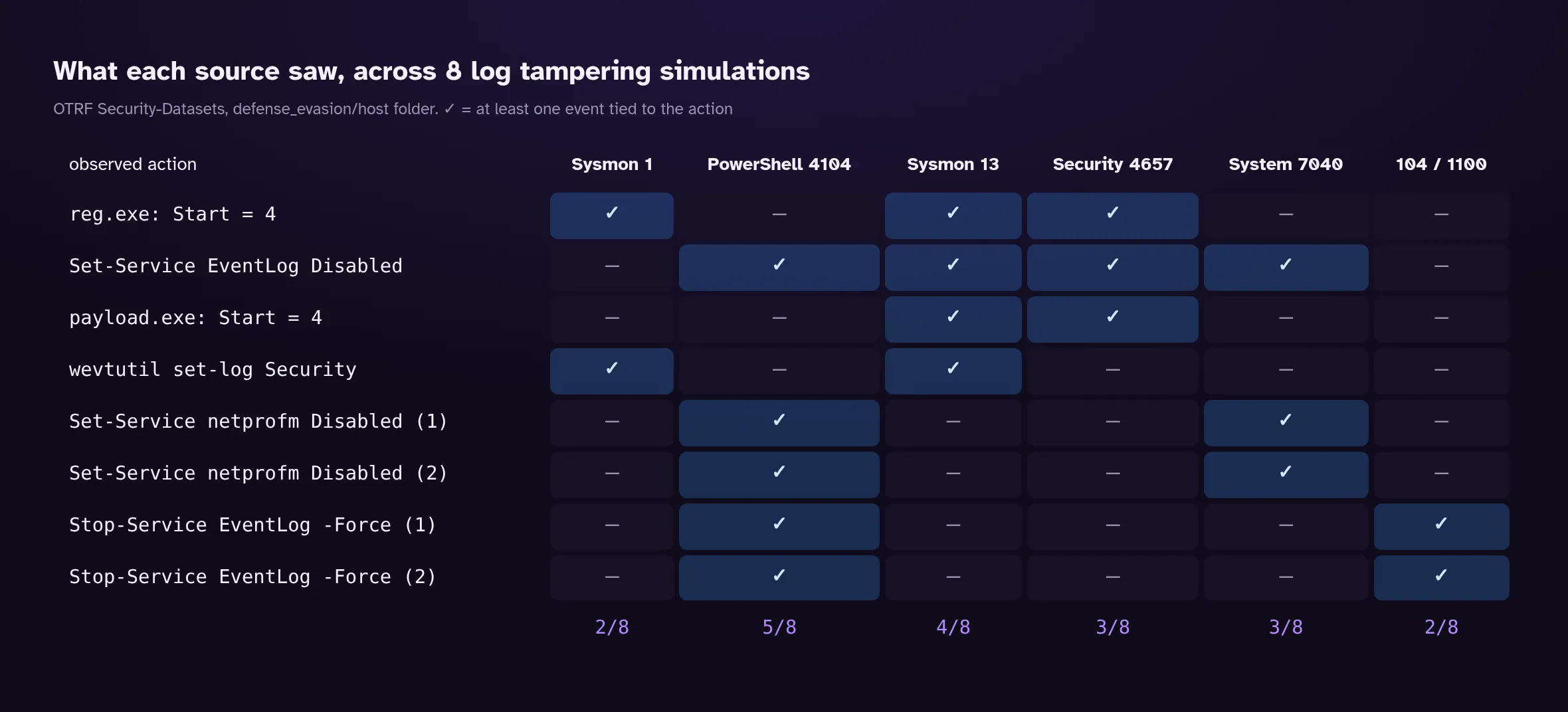
The best source, 4104, sees five actions out of eight. None sees more. And the one most people would bet on, Sysmon 1, sees only two.
Three methods, three different trails
The first three rows of the matrix do the same thing: set the EventLog service to “disabled”. They leave very different trails.
With reg.exe, you get the command (Sysmon 1), the registry write (Sysmon 13) and audit event 4657, which even gives the old and new values: Start 2->4, changed by reg.exe. But no 7040. The service manager was never involved, so it has nothing to report.
With Set-Service, two things flip. No Sysmon 1: the cmdlet runs inside an already open PowerShell session without spawning a new process. And the 4657 attributes the change to services.exe, running as SYSTEM, because the service manager is what writes the registry. The real culprit only appears in the 4104: Set-Service -Name EventLog -StartUpType Disabled. In exchange, this is the only one of the three methods that produces a 7040, with a message that couldn’t be clearer: “The start type of the Windows Event Log service was changed from auto start to disabled.”
With the executable writing straight to the registry, only the registry is left: Sysmon 13 and a 4657 naming payload.exe as the writer. No readable command, no 7040.
The lesson: a rule on 7040 alone would have caught one disable in three. A rule on the registry value catches all of them, whatever the method. It’s a good example of why you detect an effect (the value written) rather than a means (a particular command).
The rules, tested
In the rules/ folder of SigmaHQ, I didn’t find a rule targeting that Start value specifically. So I wrote one:
title: Windows Event Log service disabled via the registry
id: a8a67ff1-bf5a-4153-9b3d-9319886db7dd
status: experimental
description: |
  Detects the Start value being set to 4 (disabled) for the EventLog service. After the next
  boot, no Windows log is written at all. Also covers direct registry writes, which produce
  no System 7040 event.
references:
  - https://attack.mitre.org/techniques/T1685/001/
author: PurpleLog
date: 2026-10-17
tags:
  - attack.defense-impairment
  - attack.t1685.001
logsource:
  category: registry_set
  product: windows
detection:
  selection:
    TargetObject|endswith: '\Services\EventLog\Start'
    Details: 'DWORD (0x00000004)'
  condition: selection
falsepositives:
  - No common legitimate case identified; an unusual disk image or hardening script could do it
level: high
And since 4104 is the source that sees the most, a second rule on script blocks that stop or reconfigure the service:
title: EventLog service stopped or disabled in a PowerShell script
id: f442b228-fa54-4e8d-b410-a8b81535915d
status: experimental
description: Detects a PowerShell script block (4104) that stops or reconfigures the EventLog service with Stop-Service or Set-Service.
references:
  - https://attack.mitre.org/techniques/T1685/001/
author: PurpleLog
date: 2026-10-17
tags:
  - attack.defense-impairment
  - attack.t1685.001
logsource:
  product: windows
  category: ps_script
  definition: 'Requires Script Block Logging'
detection:
  selection_cmdlet:
    ScriptBlockText|contains:
      - 'Stop-Service'
      - 'Set-Service'
  selection_target:
    ScriptBlockText|contains: 'EventLog'
  condition: all of selection_*
falsepositives:
  - Admin scripts that restart the EventLog service
level: high
Both pass sigma check with no warnings. I ran them, along with four existing SigmaHQ rules on the same theme, using the method from the post on testing rules: convert to SQL and run against 61 OTRF datasets, that is the eight simulations plus 53 other datasets already used on this blog, which serve as false positive ground.
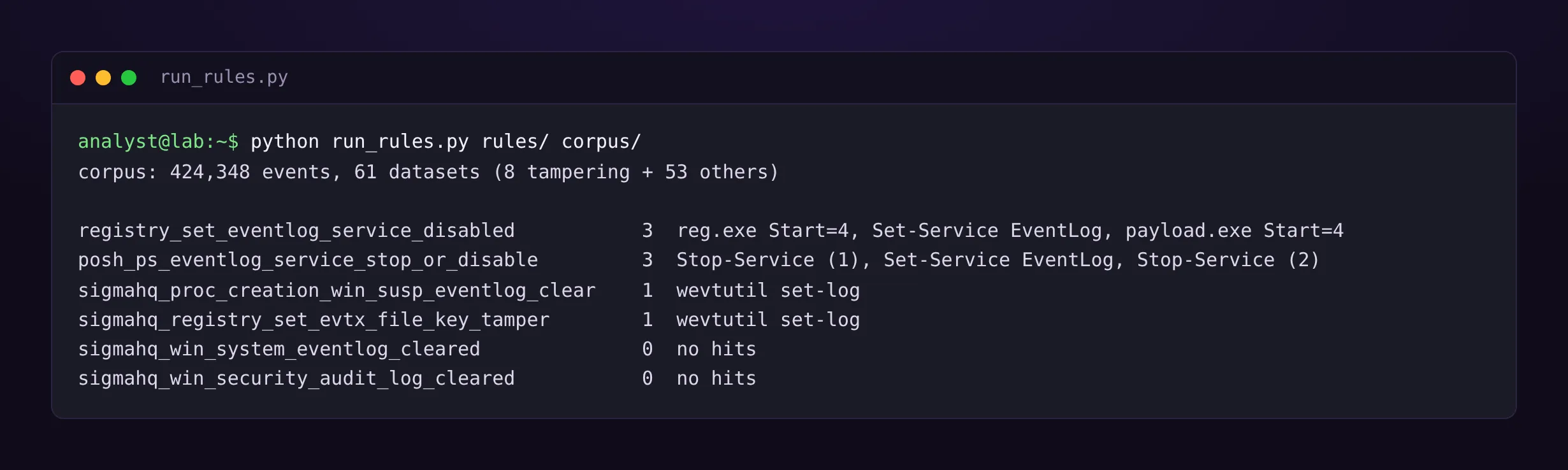
My two rules each fire on three simulations, and on none of the 53 other datasets. The two SigmaHQ rules on wevtutil and on the .evtx file path catch the Security log being moved. Together, these rules cover six simulations out of eight.
Three limits to keep in mind. The test harness does no field mapping: a rule expecting a field name other than the collector’s finds nothing, which matters for what follows. The 4657 only exists if an audit control list (SACL) is set on the registry key, which isn’t the default. And 4104 assumes Script Block Logging is on. On a fleet where neither is enabled, Sysmon is all that’s left, if it’s deployed.
The two zeros, and what they say
Two SigmaHQ rules fire nowhere, for two different reasons.
The one on clearing the Security log (events 517 and 1102) finds nothing because none of the simulations clears that log. An expected zero.
The one on event 104 (a log was cleared) is more interesting, because there are 104 events in the data. The rule looks for a Provider_Name field and uses the Channel field to mean the log that was cleared. The collector OTRF used names the source SourceName, and its Channel means the log the event is written to, here System. The name of the cleared log only exists in the message text. The rule is probably right in a SIEM that receives raw Windows logs; it’s blind on this data. That’s exactly the “fed” rung from the ATT&CK matrix post: a correct rule that doesn’t get the fields it expects.
That leaves the two Network List simulations. No rule in this test catches them, and I won’t go into how that service affects logging: I haven’t verified it. Their only visible trace is a 7040 on that service and the 4104 for the command.
Catching the silence itself
All these rules look at the seconds before. You also need to look after: a machine that sent thousands of events a day and now sends nothing. On its own it proves nothing (machine off, agent broken, network down), but it’s exactly the kind of silence nobody notices unless someone looks for it.
// Machines that were sending Security events and have gone quiet
SecurityEvent
| where TimeGenerated > ago(7d)
| summarize LastSeen = max(TimeGenerated), Volume = count() by Computer
| where LastSeen < ago(2h) and Volume > 1000
| sort by LastSeen asc
The query passes Microsoft’s official KQL parser against the documented SecurityEvent schema; I haven’t run it on a live workspace. Tune the thresholds: two hours and a thousand events suit a chatty server, not a roaming laptop.
Takeaway
Turning off the logs isn’t one action, and no source sees every variant. The two sources that carry the most weight here are Script Block Logging and registry monitoring, provided either is enabled, which brings us back once more to the point of the Sysmon configs post: detection starts with what you chose to collect.
And silence is a signal. Looking for it actively costs one query.
References
- OTRF, Security-Datasets, folder
datasets/atomic/windows/defense_evasion/hostand the previously usedlateral_movement/hostandcredential_access/hostfolders (MIT licence) - MITRE ATT&CK v20, T1685.001 Disable or Modify Windows Event Log
- SigmaHQ, sigma repository, commit
c04ad420b46c, rulesproc_creation_win_susp_eventlog_clear,registry_set_evtx_file_key_tamper,win_system_eventlog_cleared,win_security_audit_log_cleared(DRL 1.1 licence) - Microsoft, SecurityEvent